Start with the right kind of check
A power of attorney lets one person act for another within specified terms. Before handing over documents or accepting someone’s instructions, check the electronic record through the Ministry of Justice. The verification service is designed to show the record’s status and clauses and provide its electronic copy.
Use Verify power of attorney when you have a particular document to check. Use My powers of attorney when you are the principal or agent and need to find your own records. Issuing a new power of attorney is a separate action. Do not start an issuance application merely to see whether an existing document is valid.
Have the correct reference details ready
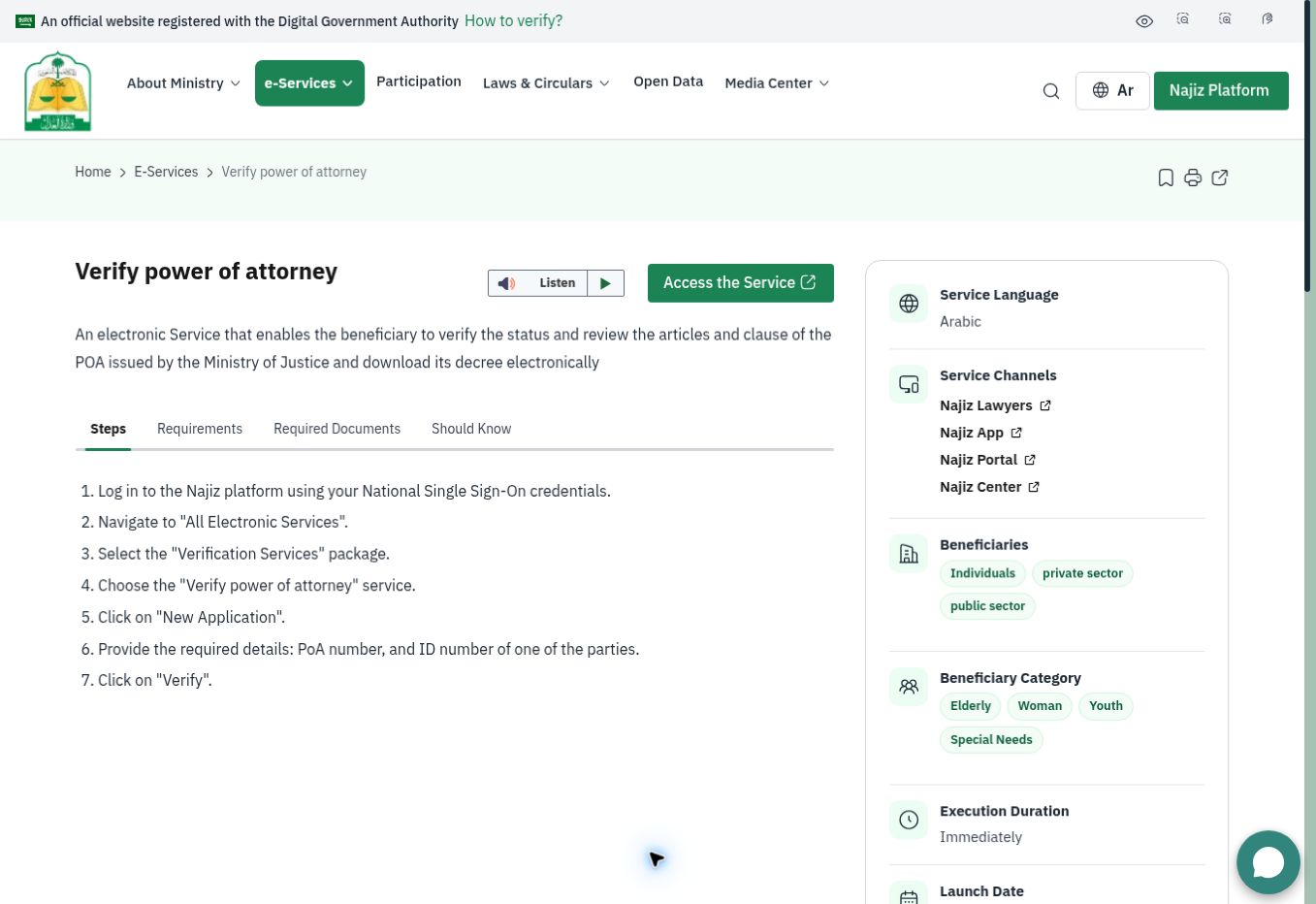
The Ministry lists the power-of-attorney number and the identity number of one party among the verification requirements. Its public guidance describes National Single Sign-On access and also a verification route using an identity number and mobile verification without a full Najiz sign-in. Follow the route actually offered on the official service.
Copy the reference from the original message or document carefully. Keep the parties’ names nearby so you can compare them with the result. Avoid testing guessed numbers or asking another person for a Nafath approval code. The aim is to verify a document, not gain access to their account.
Open the official verification service
From the Ministry service page, open Najiz. In the signed-in route, choose All Electronic Services, then Verification Services and Verify power of attorney. Start a new request, enter the requested reference details and run the check. These labels come from the Ministry’s published workflow; the live layout may move them.
If the result is not found, check for a typing error before making further assumptions. Record the error wording and ask official support which reference or verification route is required. Do not describe a document as forged solely because one online attempt failed.
Read three things in the result
First, compare the parties with the people involved in the proposed transaction. Second, check the current status. Third, read the clauses covering the action being requested. A match on the document number does not by itself answer whether a particular instruction falls within its terms.
For a significant transaction, give the relevant organization the current verified record and ask it to confirm the authority it requires. This guide does not interpret a disputed clause or decide the legal effect of a document. A current verification result is a starting point for that review, not a substitute for it.
Find records where you are principal or agent
The Ministry’s My powers of attorney service offers separate principal and agent views. Its published route is Najiz sign-in, All Electronic Services, Powers of Attorney and Declarations, then My powers of attorney. Open the appropriate tab and select the record you want to review.
This route is useful if you have lost the old PDF or need to compare several records. Note which document is relevant before sharing anything: sending every power of attorney in your account creates unnecessary confusion and exposes information unrelated to the task.
Why an old copy is not enough
The Ministry describes electronic powers of attorney as fully digital and not requiring printing, stamping or signing. Its issuance guidance also explains that parties can remove themselves through the electronic service and that the document is automatically revoked when a party dies. A previously downloaded copy may therefore no longer describe the current position.
Recheck close to the time you will rely on the document. If a party says an older version has been replaced or changed, ask them to provide the current reference rather than writing alterations onto a printout.
Keep a focused verification record
Save the document reference, the date you checked it and the result relevant to your transaction. If something is unclear, describe the exact issue to Ministry support or an appropriately qualified adviser. Keep your own checklist separate from the official document so an editorial note cannot be mistaken for an additional clause.